Bringing Your Linux Desktop into Virtual Reality with WayVR
Introduction
For Linux users, virtual reality (VR) has long been a frontier that demands extra effort and customization. While solutions like WiVRn can stream VR applications from Linux to standalone headsets, a new project called WayVR aims to go further: it brings your entire Linux desktop into the VR space, letting you interact with your computer as if you were sitting right in front of it. This article explores how WayVR works, how it differs from existing tools, and why it's an exciting development for VR on Linux.
What is WayVR?
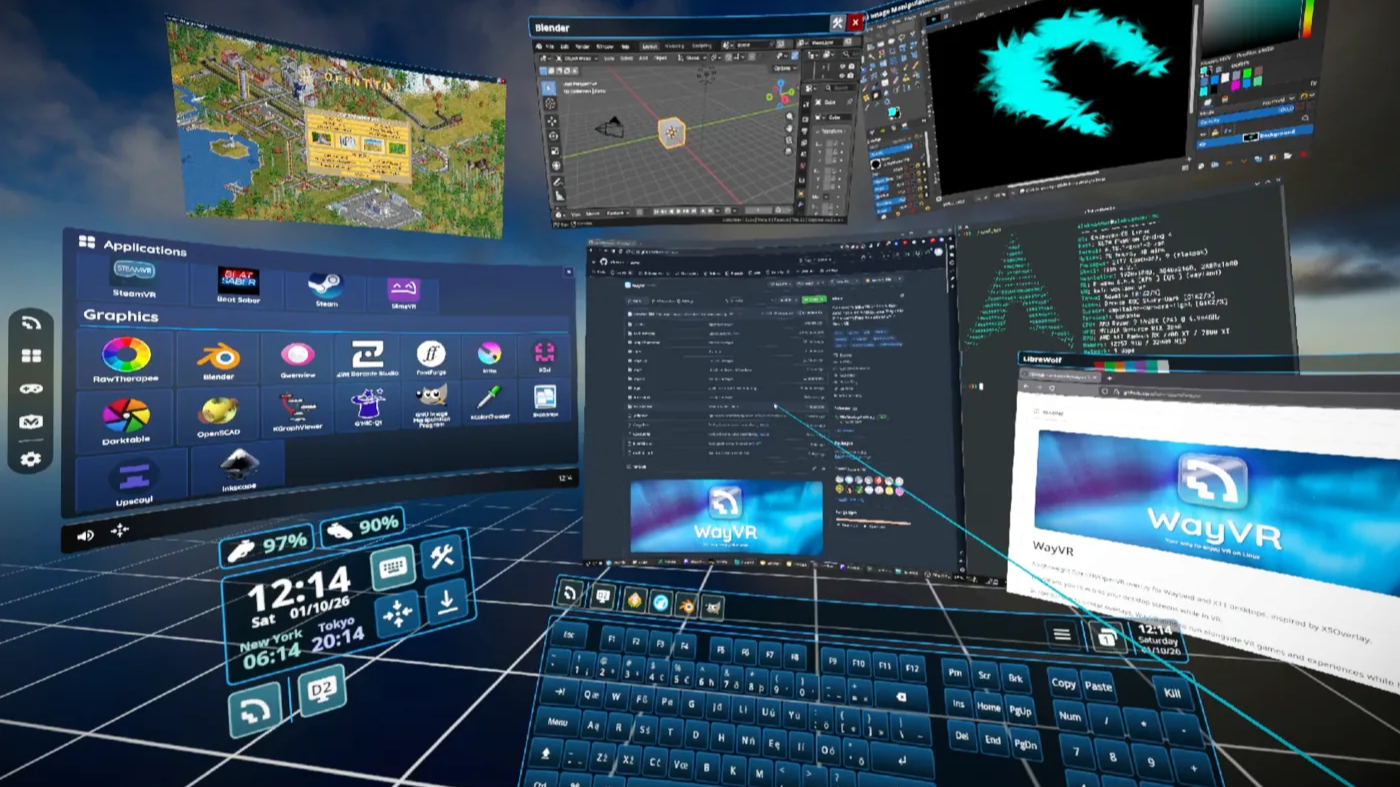
WayVR is an open-source project that provides desktop control and application launching from within a VR session. Instead of treating your headset as a passive monitor that merely displays output from a running application, WayVR transforms the headset and controllers into active input devices. You can click, type, launch programs, and navigate your Linux desktop using the same hand gestures and controller inputs that you would use in a VR game. The user interface is highly flexible, allowing you to rearrange windows, resize them, and even use a virtual keyboard for text entry. In essence, WayVR bridges the gap between traditional desktop computing and immersive VR environments.
Key Features
- Desktop integration: View and interact with all your open windows and applications.
- Application launcher: Start any program from within VR without removing your headset.
- Controller support: Use VR controllers for clicking, scrolling, and typing.
- Customizable UI: Adjust the layout and appearance of your virtual desktop.
How WayVR Differs from WiVRn
To understand WayVR's impact, it helps to compare it with WiVRn, another popular Linux VR tool. WiVRn enables streaming of VR applications from a Linux PC to standalone headsets (like the Oculus Quest) over Wi-Fi. It works well for gaming and dedicated VR experiences, but it limits the headset to acting as a remote display—a pseudo-monitor that only receives the output of an already-running VR application. You cannot, for example, see your desktop or launch a new app from within the VR environment without first removing the headset. WayVR solves this limitation by providing bidirectional interaction: the headset becomes a fully functional workspace where you can control every aspect of your computer. This is a considerable step forward for convenience and general usability, especially for users who want to perform multitasking or development work in VR.
Comparison Table
| Feature | WiVRn | WayVR |
|---|---|---|
| Streaming VR apps | Yes | Yes (via integration) |
| Desktop access | No | Yes |
| Application launching | No | Yes |
| Controller interaction | Limited | Full |
Setting Up WayVR on Linux
Getting started with WayVR requires a compatible Linux system, a VR headset (preferably with controller support), and a willingness to dive into a project that's still evolving. Here's a basic outline of the setup process:
- Install dependencies: Ensure you have the latest Mesa drivers, Vulkan support, and the necessary VR runtime (like Monado or SteamVR/proton).
- Clone the repository: Download the WayVR source code from its official Git repository.
- Build from source: Compile the project using the build instructions provided in the documentation.
- Configure your headset: Set up your headset with the appropriate drivers (e.g., OpenHMD for DIY headsets, or SteamVR for commercial ones).
- Launch WayVR: Start the WayVR session, then put on your headset to begin interacting with your desktop.
Detailed instructions are available on the WayVR GitHub page. Since the project is under active development, expect regular updates and improvements.
Customizing Your VR Desktop
One of WayVR's strengths is its flexibility. You can adjust the virtual desktop to suit your workflow:
- Layout options: Arrange windows in a curved arc, a flat grid, or a 3D stack.
- Virtual keyboard: Type using controllers or a physical keyboard that appears in your field of view.
- Gesture controls: Map custom gestures to common actions like opening a terminal or switching workspaces.
- Multiple monitors: Simulate an extended desktop with additional virtual screens.
The Future of VR on Linux
WayVR represents a fertile ground for experimentation. As the project matures, it could inspire innovative user interfaces that go beyond traditional point-and-click. For DIY headset builders and open-source enthusiasts, this is an exciting area to explore. The possibilities include new input methods (eye-tracking, brain-computer interfaces), collaborative virtual workspaces, and seamless integration with Linux-based productivity tools. WayVR is not just a utility—it's a glimpse into how we might interact with computers in the coming years.
Conclusion
WayVR is a game-changer for Linux users who want to enjoy the convenience of VR without leaving their desktop behind. By enabling full desktop control inside a headset, it bridges the gap between immersive experiences and everyday computing. Whether you're a developer looking to code in VR, a gamer who wants quick access to settings, or a tinkerer exploring new interfaces, WayVR offers a solid foundation. The project is actively evolving, so check out their repository and join the community to shape the future of Linux VR.